
Cleanup Your Phone
DOSA AppsPersonalization
4.5971.00 Reviews
- Version
- 4.1.10.1
- Installs
- 10.00M
- Age Rating
- Everyone
Screenshots


Our Review of Cleanup Your Phone
 Analysis by Appyee
When my phone starts warning me about storage, I don’t want to spend the evening guessing which files are safe to remove. I want a clear route from “nearly full” to “room to breathe,” without accidentally losing photos or app data. That practical problem is the reason I’d consider Cleanup Your Phone: it is a free personalization app from DOSA Apps built around tidying up a device, rather than changing how it looks. Its appeal is straightforward, but a cleanup tool is only useful when I can understand what it proposes and stay in control of what gets deleted.
Start with the storage problem, not the delete button
My first step would be to check what is actually filling the phone. A crowded gallery, large downloads, app data and temporary files are different problems, and clearing one will not necessarily solve the others. The app’s central promise is to help clean up storage, so it makes most sense when I have a specific reason to look: a warning, a failed download, or a device that has gradually accumulated files I no longer need.
That distinction matters because “cleaning” is not the same as speeding up every part of a phone. If the main issue is a nearly full device, finding removable material can help. If an app is crashing because of a software bug, deleting unrelated files is unlikely to fix it. I’d use the tool as a way to inspect and organize a storage problem, not as a cure-all for every slowdown.
Getting Started with a Fresh Slate
First things first, downloading Cleanup Your Phone was a breeze. The app is available on both Android and iOS, so no matter what device you're rocking, you're covered. Once installed, the app greets you with a sleek and straightforward interface. I appreciated the clean design right off the bat—it made navigating through the features super intuitive.
On opening the app, you’re immediately prompted to perform a quick scan. This initial scan is a lifesaver. It digs through your phone to unearth all those sneaky files hogging space. I was surprised to find how much junk had accumulated without me even realizing it.
Turn scan results into a careful cleanup
After a scan, I would treat the results as a shortlist to review, not a command to clear everything. A file can be large and still be important: a saved video for a trip, an offline playlist, or a document I meant to send later. The useful habit is to check the type and context of each suggested item before removing it, then tackle obvious clutter first. That keeps the cleanup focused and makes it easier to tell whether the action actually helped.
A realistic example is getting ready to record a school performance or a family event. If the phone is nearly full, I could inspect storage before leaving, remove disposable items I recognize, and keep the photos and videos I want to capture. I would not use a last-minute scan as a reason to delete unfamiliar files in bulk. The extra minute spent checking is a better trade-off than discovering later that an important item was removed.
It is also worth doing this in small passes. I’d clear one obvious category, check the available space again, and then decide whether another pass is needed. That approach makes the outcome easier to judge and reduces the chance of treating a large cleanup as a routine button press. If I am unsure what a file is for, leaving it alone is a sensible result—not a failure to clean.
Features That Shine
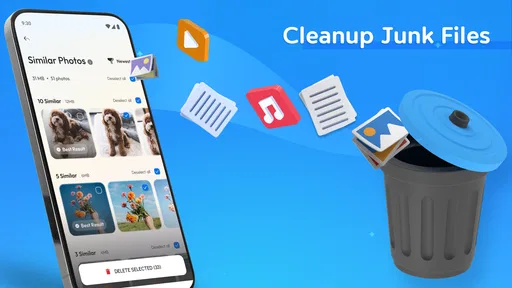
One of the standout features of Cleanup Your Phone is its ability to thoroughly analyze storage usage. The app breaks down space consumption by apps, media, and miscellaneous files. I loved how it offered suggestions on what could be deleted without losing important data. It’s like having a personal digital organizer who knows exactly what you need to keep and what’s just clutter.
The app also includes a cache cleaner. You know how apps love to store temporary files that you don't need? This feature clears all that fluff with just a tap. I noticed a significant boost in my phone’s performance after using it. No more lagging or sluggish responses!
For cache clearing, I’d think of the benefit as freeing storage or refreshing an app’s temporary data, not as a guaranteed permanent performance boost. Some apps may recreate cached files during normal use, so any space recovered can be temporary. If an app behaves oddly after its cache is cleared, I would reopen it and allow it to rebuild what it needs before deciding whether the cleanup caused a lasting problem.
The app’s analysis is most helpful when I use it to spot patterns. For example, if media is taking up much more room than apps, uninstalling programs is unlikely to solve the immediate shortage. If a particular app is the main space user, I can decide whether to keep it, remove downloaded content through that app, or uninstall it. Checking the category before acting is a small step that prevents a common mistake: clearing easy-to-find files while leaving the real space consumer untouched.
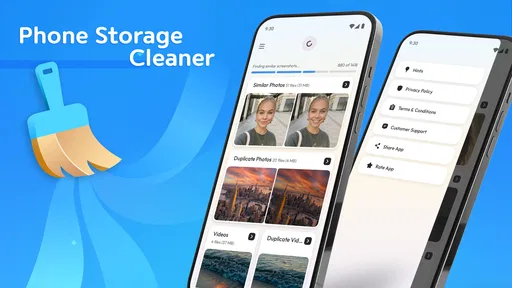
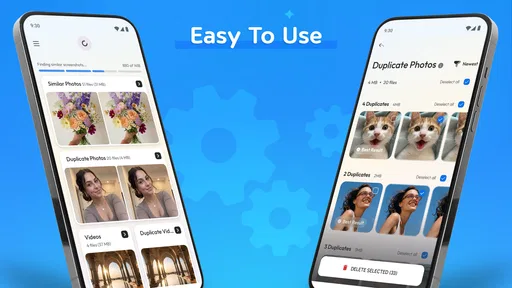
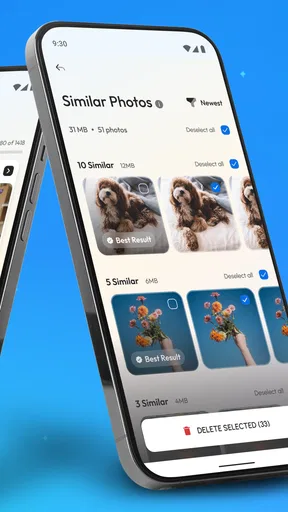
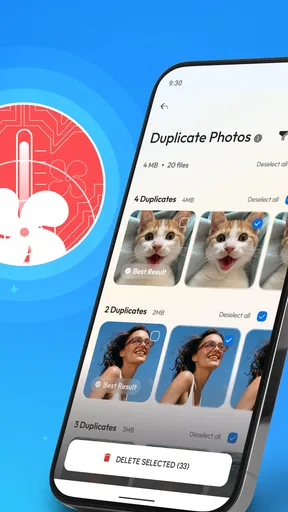
Another feature worth mentioning is the duplicate photo remover. I don’t know about you, but my gallery was full of almost identical selfies and burst shots. The app analyzes your photos and picks out duplicates, allowing you to delete them easily. This feature alone saved me loads of space.
For a photo review, I would compare the candidates before confirming anything. Similar images are not always interchangeable: one may be sharper, include someone who was blinking in another, or be the only copy edited the way I like. A useful workflow is to review a small group, keep the best version, and only then remove the extras. That is slower than clearing a whole selection blindly, but it gives the duplicate finder a clear role as a sorting aid rather than an automatic judge of which memory matters.
Privacy, permissions and the handoff to your own judgement
When it comes to apps that have access to your files, security is always a concern. Cleanup Your Phone reassured me with its clear privacy policy. It doesn't upload or share your data with third parties, which is a big deal for me. Plus, the app doesn’t require unnecessary permissions, so you know your personal info is safe.
Even when I’m comfortable with a cleanup tool, I still treat file access as a reason to be deliberate. I would grant only the access needed for the task I’m trying to do, and I’d read the prompts on my device rather than tapping through automatically. The handoff is simple: the app can identify candidates, but I remain responsible for deciding what belongs on my phone. That matters most for personal photos, work documents and anything that would be difficult to replace.
One question a careful user may have is whether cleaning a phone also backs up important files. I would keep backup and cleanup as separate jobs: preserve valuable photos and documents using a backup method I already trust, then remove only items I have checked. Another practical question is whether a scan needs to be run often. I would make it occasional and need-based—when storage is tight or after a busy period of downloads—rather than turning cleanup into a daily ritual.
Extra Tools for the Tech-Savvy
If you’re into optimizing your device further, the app also offers a CPU cooler and battery saver. The CPU cooler helps manage overheating issues that many users face, especially during heavy usage. The battery saver suggests tweaks you can make to extend battery life. I tried it, and my phone definitely seems to hold a charge longer now.
I’d be cautious about expecting these tools to replace the phone’s built-in battery and temperature controls. Heat can come from demanding tasks, a warm environment or a device problem, and a cleanup app cannot make every cause disappear. Likewise, battery life depends on how the phone is being used. I’d treat the suggestions as prompts to review habits, then check whether the change actually suits my routine rather than assuming one adjustment will transform endurance.
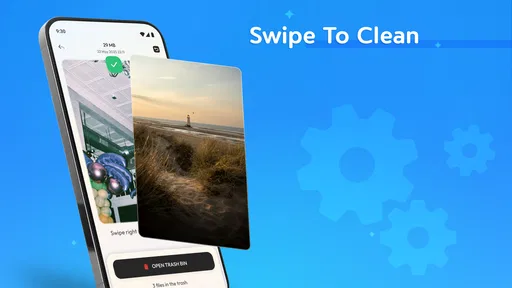
There’s also a handy app manager, which lets you batch uninstall apps you no longer need. It’s much quicker than going through each one manually.
Batch removal is convenient when I already know which apps I’m finished with, but it is not the right moment to make uncertain choices. Before removing anything, I’d consider whether I use it for travel, banking, work or device setup, and whether I remember the sign-in details if I reinstall it. If I’m simply trying to free a little space, deleting a forgotten game may be sensible; removing an app whose local files matter deserves more thought.
Where the workflow can break
The main limitation of any cleaner is that it can make a complicated decision look deceptively simple. A scan can surface candidates, but it cannot know that a particular screenshot is a receipt I still need or that an old download is the only copy of a document. The app is a poor fit for someone who wants every cleanup to happen automatically without reviewing results, or for someone who expects it to recover files already deleted.
It may also be unnecessary if the phone has plenty of free space and its built-in storage tools already make the problem easy to manage. The usual alternative is to open the system’s storage settings and review apps, downloads and media there. That route can be enough for someone who prefers fewer utilities and wants to handle each category directly. Cleanup Your Phone is more appealing when I want a guided place to inspect several kinds of clutter, especially duplicate pictures, but its suggestions still need my judgement.
The app is free to install, though it includes in-app purchases ranging from $0.99 to $99.99 per item. I would look closely at any purchase prompt and decide whether an optional feature is worth paying for before proceeding; the basic idea of reviewing storage does not mean I should agree to a purchase just to clear files. It is rated for Everyone, has an average rating of 4.5 from around 249,000 ratings, and has been installed over 10 million times. Those figures suggest broad use, but they do not tell me whether the app’s particular approach will suit my habits.
Version 4.1.8 is the current release, and the app runs on Android 5.0 or later. The product was released on June 10, 2020, which gives it a longer history than a brand-new utility, although I would still pay attention to how it behaves on my own device. Store popularity is not a substitute for checking scan results, reading permission requests and keeping a separate copy of anything important.
What the cleanup leaves behind
My preferred outcome is not simply a larger free-space figure. It is a phone where I know what I removed, can still find the files I care about, and have a clearer sense of what tends to fill storage. After a cautious pass, I’d check the gallery and reopen any apps whose temporary files I cleared. If the phone feels unchanged, that is useful information too: the storage issue may have been solved without affecting performance, or the original slowdown may have had another cause.
For a person who regularly accumulates duplicate shots, downloads and forgotten apps, the combination of storage analysis, photo review and app management makes this a more focused choice than manually opening every folder. Someone who wants a minimal setup, dislikes granting file access, or already manages storage comfortably through built-in tools may be better served by sticking with those tools. I would choose based on the workflow I actually need, not on a promise that every phone can be made dramatically faster by cleaning it.
Final Thoughts
All in all, Cleanup Your Phone is a must-have if you’re looking to streamline your device’s performance and free up space. It’s easy to use and packed with features that genuinely make a difference. My phone hasn’t felt this zippy in ages!
So, is it worth a download? Absolutely. Whether you’re a tech pro or someone who just wants their phone to run smoothly without the clutter, this app delivers. Give it a try and see your phone transform from a digital dumpster to a sleek, efficient gadget.
My recommendation comes with one condition: use it as a helper, not as an authority. I’d start with the storage scan, review the proposed cleanup, and make one careful change at a time. That makes the app most useful for people who want a guided way to reclaim space without losing control of their files. If that sounds like your situation, it is worth trying; if your phone is already easy to manage, you may not need another tool in the process.
Verdict
Strengths of Cleanup Your Phone
- Improves device speed significantly
- Easy-to-use interface for all users
- Frees up valuable storage space
- Offers real-time cleaning updates
- Includes helpful app management tools
Limitations of Cleanup Your Phone
- Contains ads that can be intrusive
- Some features require in-app purchases
- May delete necessary files if not careful
- Limited customer support options
- Occasional false positives in scans
Other Releases by DOSA Apps
View All
Cube Cipher - Cube Solver
Educational4.5

Recover Deleted Photos App
Photography4.4

Microphone Amplifier
Medical4.2

Portable WiFi - Mobile Hotspot
Communication4.4
Similar Picks in This Category
View All
Microsoft SwiftKey AI Keyboard
SwiftKey4.3

Wallpapers
Google LLC4.1

Zedge™ Wallpapers & Ringtones
Zedge4.7

Yandex Browser with Alice AI
Direct Cursus Computer Systems Trading LLC4.3

Ringtone Maker:create ringtone
Big Bang Inc.4.7

Fonts Keyboard
Fonts Keyboard3.9
Frequently Asked Questions
What features does Cleanup Your Phone offer to enhance device performance?
Cleanup Your Phone offers a suite of features designed to optimize your device's performance. This includes junk file removal, memory booster, and cache cleaner. Additionally, it provides tools for managing apps and files, helping to free up storage space and improve overall speed. The app also includes battery-saving options to extend device usage.
Is Cleanup Your Phone safe to use, and does it protect user data?
Yes, Cleanup Your Phone is designed with user safety in mind. It uses secure protocols to ensure that your data is not compromised during the cleaning process. The app also does not collect personal information or sensitive data, focusing solely on optimizing your device's performance without risking your privacy.
How does Cleanup Your Phone handle app permissions and what access is required?
Cleanup Your Phone requires access to storage and system settings to effectively clean and optimize your device. These permissions allow the app to manage files and remove unnecessary data. Users should review and understand these permissions before installation to ensure they are comfortable with the level of access granted.
Can Cleanup Your Phone improve battery life, and how does it achieve this?
Yes, Cleanup Your Phone includes features that can help extend battery life. It identifies and stops background apps that consume excessive power, and optimizes device settings for better energy efficiency. By reducing unnecessary power usage, the app can help prolong your device's battery life between charges.
Are there any in-app purchases or advertisements in Cleanup Your Phone?
Cleanup Your Phone is free to download but includes optional in-app purchases that unlock premium features such as advanced cleaning tools and ad-free usage. The free version contains advertisements, which help support the app's development. Users can choose to upgrade for a more seamless experience.
